Salam Ali,
i think you did everything correct.
but i assume that you missed one thing - and i might be wrong.
first, let me review what have you done and correct me if i am wrong.
- Native Vlan is (our home) with VLAN ID 1 and IP Address 192.168.1.98 and your default gateway is a router with IP Address of 192.168.1.99
- a VLAN named (Data) was created with VLAN ID 10 with routing feature enabled on it, and the VLAN Interface on the Aruba Instanton switch is 192.168.2.98
- port 8 on the switch is configured as UNTAGGED Vlan 10 (Data), and tagged other VLANs - tagging other vlans will not affect this scenario but for more advanced scenarios i recommend to have better information to handle more advanced scenarios -
- taking into consideration that when you connect to port 8 (VLAN 10) you are assigning the device a static IP not obtaining ip automatically (as Instanton when used via cloud management lacks this feature).
up to here everything seems in place and ready to go.
however, you must start looking to the other side of the network, which is the Internet router that you have.
as a router, it has in its own routing table the subnet 192.168.1.0/24 as it has an ip address of 192.168.1.99
**but the router by default does not know, or has in its routing table the subnet of 192.168.2.0/24, and does not know how to reach it.
even if the packet came from LAN interface, that is NOT how the routers work, they always look into there routing tables.
so the solution is to configure a route on the Internet router (and hope that you router support adding "Static Routes")
this route shall direct the router to reach the subnet 192.168.2.0 via 192.168.1.98
if configured successfully, the instant on is sending the Internet Traffic came from VLAN 10 (192.168.2.0/24) to the default gateway on VLAN 1 192.168.1.99
and the router can send the reply from internet to the subnet 192.168.2.0/24 via the Layer 3 switch Aruba Instant on VLAN 1 IP which is 192.168.1.98
have a nice network :)
Best regards,
Ahmad Qattan
Original Message:
Sent: 12-20-2022 03:40 PM
From: Ali Khademi
Subject: non-native/non-default VLAN internet connection
Dear Arjen,
Thanks for sharing your thoughts. What I want to do is very simple. I want to have a separate VLAN ID ( e.g. Guest 10) to give and route it to the internet without giving it access to local computers.
Just to be clear, in my current setup, I untagged port 8 to VLAN 10 (DATA) and my expectation is that with proper routing setup, host on VLAN 10 can go to internet.
Another example is VOIP. I want to my VOIP traffic directly goes to internet without being disturbed by other traffic.
I hope someone can help me out. My assumption a managed switch should be able to do that without using firewall or router.
Regards,
Ali
------------------------------
Ali Khademi
Original Message:
Sent: 12-20-2022 09:19 AM
From: Arjen Mulder
Subject: non-native/non-default VLAN internet connection
Dear Ali,
The network you use for your laptop should be on an "untagged" network. I have no idea what tagging does, but when experimenting myself on my 1930 24G switch, you must focus on an untagged network that is designated to the port you wish to use. When I set up multiple VLANs, then also noticed some hickups on one of the newly created networks (and my laptop stopped working on that port, but still worked on the other ports on which I had changed nothing... hence, the newly created VLAN was the culprit).
Does your laptop work on any of the other ports?
I myself come from another switch (not Aruba), and then I always learned that "Port 1" should be typically be used for the connection to your router (you seem to have used port 9). When migrating to Aruba, I stuck to that convention, and it works for me.
------------------------------
Arjen
Original Message:
Sent: 12-16-2022 08:56 AM
From: Ali Khademi
Subject: non-native/non-default VLAN internet connection
Greeting,
My intention is not to open Pandora box but looks like after 10 days of trial and error, I need help. I have bought Aruba Switch 1930 8G 2SFP. It is onboarded with cloud portal. I have created VLAN 10 as Data and untagged on port 8

No Network security and Unrestricted access as well.
In the switch connectivity it is routable as well
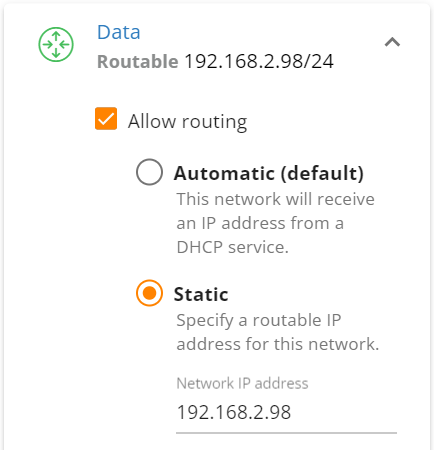 I have my laptop connected to port 8, with manual IP address of 192.168.2.100/24
My expectation is my laptop connects to internet while it cannot.
my switch IP is:
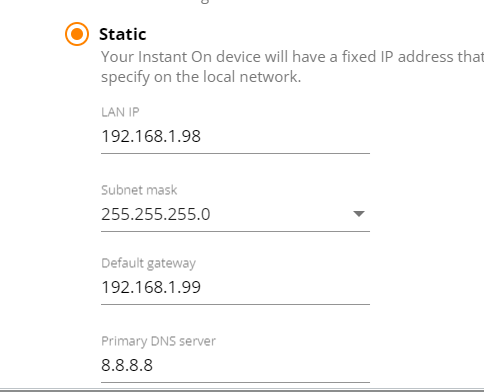 Here is port 8 configuration

"Our Home" is native(default) VLAN ID=1
I really appreciate if someone can help me what am I missing. I am expecting switch does level 3 switching and I will be able to connect different VLANs to internet using the same router. I have a very simple (wireless) router at home and no firewall yet.
Regards,
Ali
------------------------------
Ali Khademi
------------------------------