In a small network if you are not filtering anything between VLANS for security or doing QoS, VoIP .... there may not much value in using VLANS in the first place. If you really do need separate VLANS you may be better routing each through a firewall. That would provide much easier traffic control and more visible (easy) security policy management.
You have to remember switch ACL's are not stateful like a firewall. They manage packet by packet not traffic flows. So looking at you ACL I don't think it is doing what you think it is,
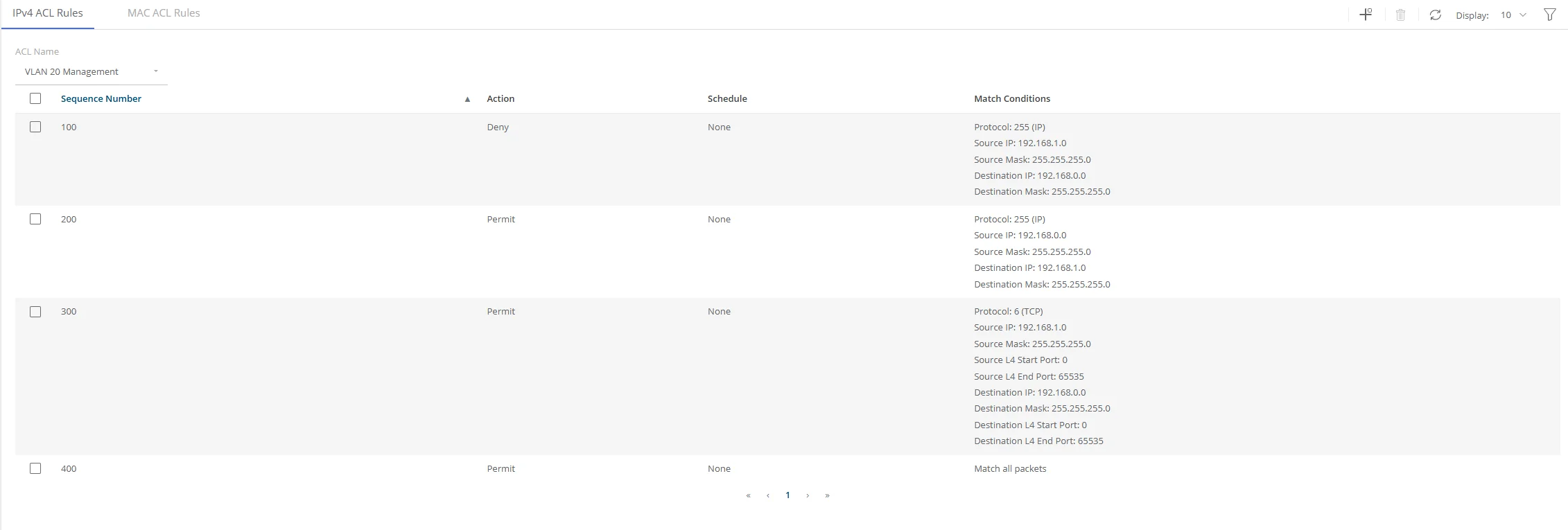
The 1st acl is blocking all traffic from 192.168.1.0 (VLAN 20) to 192.168.0.0 (VLAN1)
The 2nd acl is allowing all traffic from 192.168.0.0 to 192.168.1.0
At that point none of the following policies will do anything because they are overridden by the 1st. After a Deny there is no more evaluation of matching packets
So when a device from 192.168.1.0 sends a packet to 192.168.2.0 the packet is blocked.
When a device from 192.168.0.0 sends a packet to 192.168.1.0 the packet is received, however when and device in 192.168.1.0 sends the return packet it will still be blocked by the 1st acl. Essentially it is a one way street. Imagine talking to someone with a broken mic on their phone they hear you but you never hear them.
On a firewall depending on the order that type of acl/policy may work because firewall policies are stateful and allow expected return traffic to ingress back in.
Which brings me back to my first point. If you really do want the security and control of separate vlans you may be better disabling routing on the switch and using a firewall to route or NAT between vlans. IMO Basic firewall policies are easier to understand and manage and offer better security controls that switch acls. If you don't have a good understanding of your security methodology you are only one keyboard error away from having no security.
Hope this helps
Jim G
Original Message:
Sent: 2/26/2025 2:44:00 PM
From: Noam
Subject: No ethernet connection - 1930 instant on
Hi all,
I am little bit new to networking and I just bought my first managed switch - aruba instant on 1930. I have problem after setting 2 VLANS, 1 is for switch management and ethernet and other is for my VM, I set few ACL rules to permit and reject access to VLAN 1 , and it seems that I set something wrong because I cant get access to ethernet from VLAN 20, I have set routing on and set IP to VLAN and still cant access to web. VLAN 1 segment 192.168.0.X VLAN 20 segment 192.168.1.X. I would like to know what I did wrong
thanks for reading and for your time
------------------------------
Noam Gr
------------------------------