Many thanks for your suggestions, Ethan.
As not every family member appreciates me experimenting with the wifi, and as I wanted to sort out some stuff prior to replying, it has taken a while (had to find a timeslot that was least inconvenient).
Our 4 APs have been wired with the patch cables I mentioned in my first posting, at lengths varying in between approx. 20-30m (hence, 21-32yd).
For all other network connections I have used solid CAT7 wiring, but unfortunately I did not have the physical space for thicker wiring towards the APs.
Here's what I have tried so far.
Step 1: Simply connect an AP to the Aruba PoE switch. I took the AP closest to the switch (this will be some 15-20m of wiring length), and then we got the situation as in Fig 1, Fig 2, and Fig 3 (all below). That is, the AP22 now receives data from another AP (and not from the switch).
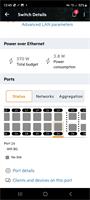
The above was all using an PoE budget based on "class". If I set this to "Usage (default)" then the power consumption goes up from 3.8W to 4W.
Step 2: I took the AP22 from the wall, and directly connected it to the Aruba switch, using a 30cm (=11 inches) CAT6a patch cable.
Fig 4 shows the stunning result (a whopping 1Gb/s data rate, whilst power consumption goes up from 4W to 5.1W), and Fig 5 show that this time, the AP is indeed fully integrated to the Aruba switch.
Hence, no matter how much I regret it, to me (as a non-expert) it seems the wiring does produce a bottleneck.
Yet, again, using the stupid antique Zyxel as a parallel PoE switch, the APs all do fine (albeit that their network speed is capped at 100Mb/s).
Fig 6 (below) shows the network topology when using my Aruba PoE switch for all fixed/VLAN connections, and the Zyxel next to it for the APs only.
I have experimented creating additional VLANs, with tagging and untagging (no idea what that really does, but as long as a port has been assigned some untagged VLAN, it works), but I honestly do not know what to do next.
According to the AP22 specs, it has a MAX power consumption of 10.1W, but I have no idea what is its "typical" power consumption.
Recapping,
when AP is in place on the wall:- Cable length 15-20m (CAT7 patch cable);
- Power consumption approx. 4W when connected to the Aruba switch;
- No data is coming from the Aruba switch (picked up from other access point).
By contrast,
when AP is using short patch cable only:- Cable length 0.3m (CAT6a patch cable);
- Power consumption 5.1W when connected to the Aruba switch;
- Data comes at max. speed of 1Gb/s from the Aruba switch.
Lastly,
when AP is hooked up to old Zyxel PoE switch:- Cable length 15-20m (CAT7 patch cable);
- Power consumption unkown (I cannot read out the Zyxel switch);
- Data comes at max. speed of 100Mb/s from the Zyxel switch.
Where, oh where to look next?
As I noticed a slightly higher power consumption on the short patch cable (5.1W was the highest), whereas when in place on the wall (using a 15-20m long patch cable) it consumed
less power, then I guess something goes wrong with the power allocation (or ability to feed it).
------------------------------
Arjen
------------------------------
Original Message:
Sent: 12-10-2022 01:23 PM
From: Ethan Kozak
Subject: Troubles connecting AP22 access points to 1930 PoE (JL684a) switch (power works; but no data)
Hey Arjen,
Ugh, don't you just hate these kinds of hiccups? Super frustrating, but thankfully it should be fairly easy to sort out.
Regarding the wiring, stranded isn't the best for long runs but at least it's copper. It shouldn't pose a problem in a typical house run. (Unless your four storey home is also >8,000 sq ft…?
This is most likely a configuration problem. What does your network look like? Is it flat? VLANs & subnets?
One thing about these switches is you must assign your networks to the ports you wish to use. They're "off" by default.
If you haven't already, jump into the switch settings
------------------------------
Ethan
Original Message:
Sent: 12-07-2022 02:46 PM
From: Arjen Mulder
Subject: Troubles connecting AP22 access points to 1930 PoE (JL684a) switch (power works; but no data)
Could somebody please help me out with the following?
In our newly built home (4 floors), I made sure every floor would have a wired connection for a wifi access point. Due to lack of space, I had to use rather thin cabling, and I ended up using this AWG27/7 Cat7 wiring by Draka:
IE UC900 SS27 Cat.7 PUR |
| Drakauc |
remove preview |
|
| IE UC900 SS27 Cat.7 PUR | |
| This site uses Technical & Third Party cookies for analytical purpose. If you want to know more about our cookies click here. If you want to block cookies follow the instruction. By closing this banner click here, you are accepting the use of cookies. |
| View this on Drakauc > |
|
|
By late spring, all my AP22 access points had arrived, but unfortunately, my 1930 PoE switch was still in backorder.
As we moved in over summer, and as I really wanted wifi throughout our new home, I purchased a used (old) Zyxel GS1900 Mark1 switch, just to have the PoE functionality whilst waiting for my Aruba switch to arrive. The Zyxel does the job, but it is a pig to manage (and it is slow). The access points all receive suffient power on the Zyxel (they work) and the Zyxel switch provides 100Mb/s speed to each of them (pity, as my fiber provider gives us 1Gb/s).
Now the problem.
Today, finally a lovely Aruba 1930 PoE switch has arrived (JL684a), but now I cannot get my AP22 access points working. The brand new Aruba switch does show PoE power consumption when hooking up the APs, but frustratingly enough it does not send data to them (all other wired connections work like a charm).
- When keeping 1 access point hooked up to the Zyxel, that one will work, and the other APs show up as "slaves" in the network topology (so stealing power from my Aruba switch, and de facto taking data from the Zyxel).
- When connecting all APs to the Aruba switch, none of them work (they do light up, but do not receive data).
What do I do wrong?
I have done my best to search the community for past topics, and the only things I can think of are:
- Is it possibly the wiring? I know that AWG27 is thin, but the antique Zyxel has no problems with it.
- Is it something in the settings that I overlooked? Perhaps something stupid as static IPs for the APs instead of dynamic, or something else?
I would greatly appreciate any hints. I so far only used the app to manage the network; I have a degree in mechanical engineering, and do not feel competent to start messing around with all sorts of terms I do not fully grasp.
------------------------------
Arjen
------------------------------